1Panel: The simplest way for teams to host multiple OpenClaw instances
Host multiple OpenClaw instances with 1Panel. A practical guide for teams: setup, day-to-day management, upgrades, and operating at scale.
Teams quickly discover that “getting one assistant running” is not the same as operating multiple assistants reliably for a department.
When multiple OpenClaw instances are involved, the hard part shifts from “installation” to standardization, isolation, upgrades, and day‑to‑day operations. That is where 1Panel’s web-based workflow becomes the simplest path to a production‑ready setup.
Why teams host multiple OpenClaw instances (and why it gets hard)
In a team setting, a single agent becomes a bottleneck:
- Different roles need different tools (skills), boundaries, and prompts.
- Different channels (Feishu, DingTalk, Telegram, Discord, etc.) need separate configurations.
- Different data scopes and access rules are required for compliance.
The usual pattern is a small “AI company” made up of specialized assistants:
- A coordinator / manager agent
- Specialist agents for operations, research, support, or reporting
- Dedicated agents for specific workflows (daily summary, monitoring, incident triage, etc.)
This is also why the OpenClaw marketing messaging emphasizes parallel assistants for departments.
The real problem: operating OpenClaw at scale (Day 0 → Day 2)
From team rollout experience, you can group pain points into the full lifecycle:
Day 0: setup (repeatable, fast, low-risk)
What teams need:
- A repeatable path to create instances with consistent defaults
- Clear parameters for ports, tokens, and model provider accounts
- Minimal terminal usage for non-SRE operators
Day 1: management (visible, controlled)
What teams need:
- A single UI to start/stop, view logs, and check status
- A way to manage multiple instances without confusion
- A workflow for changing configs without breaking other assistants
Day 2: maintenance (safe upgrades, backups, rollback)
What teams need:
- Predictable upgrades with verification steps
- Backup before upgrades (or a rollback mechanism)
- A way to diagnose issues quickly when concurrency grows
How 1Panel makes multi-instance OpenClaw simple
If you want the shortest explanation, it is this:
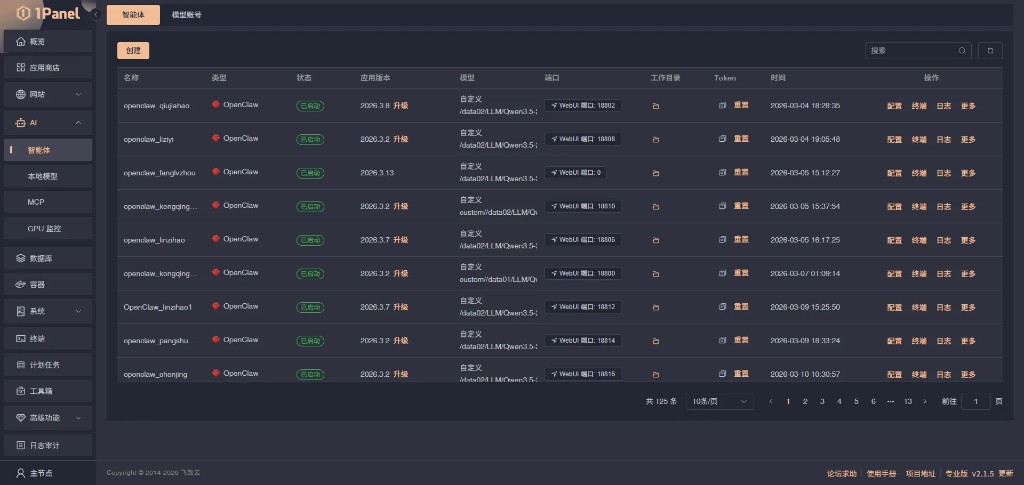
- 1Panel gives you a single UI to create, view, and operate instances.
- The OpenClaw install flow is parameterized (name, version, ports, model provider, token).
- The same click-path works repeatedly, which is exactly what a team needs.
1Panel provides a UI workflow for deploying and managing OpenClaw via its AI → Agents capability and App Store integrations, so you can scale beyond a single instance without turning operations into a pile of shell scripts.
What “simple” means in practice
- One place to manage instances: find an instance, open WebUI, view runtime status.
- Parameterized creation: name, version, ports, model provider, token—set once per instance.
- Repeatability: follow the same click-path for instance 2, 3, and beyond.
For the official OpenClaw deployment flow in 1Panel (including default ports and parameters), see: OpenClaw visual install in 1Panel App Store docs and AI Agent deployment guide
Practical guide: host multiple OpenClaw instances with 1Panel
This section is written for real operators. It is deliberately short and repeatable.
Prerequisites
- A Linux server (or servers) with stable network access
- 1Panel installed and reachable in a browser
- A valid LLM API key (or a local model already connected in 1Panel)
OpenClaw’s own quick start guide recommends installing via 1Panel as the simplest route.
Step 1 — Add model provider accounts once
In 1Panel:
- Open AI → Agents
- Switch to the Model accounts tab
- Add one or more provider accounts (for different teams, budgets, or reliability)
Step 2 — Create instance #1 (your template)
Create your first instance carefully and treat it as the baseline:
- Name: use a team prefix (e.g.
ops-openclaw,support-openclaw) - Version: pick a stable release
- Ports: keep defaults unless you have a port plan
- Token: store it in your team password manager
Step 3 — Clone the pattern across instances
For each new instance:
- Keep naming consistent (team, role, environment)
- Keep version aligned across the fleet when possible
- Separate channels and scopes (avoid “one agent sees everything”)
Step 4 — Access WebUI and verify each instance
After an instance is installed:
- Return to AI → Agents
- Find the instance
- Click WebUI
- Send a short test message and confirm a valid response
Team-scale tips that prevent common failures
Based on common team deployment patterns:
- Isolation beats complexity: prefer multiple smaller agents over one agent with too many responsibilities.
- Plan resource ceilings early: concurrency and memory spikes are the first scaling failure modes.
- Keep upgrades boring: upgrade in batches, verify, then roll forward.
- Treat tokens like passwords: rotate if leaked; avoid pasting in tickets.
FAQ
Is 1Panel only for OpenClaw?
No. OpenClaw is one use case. 1Panel is a Linux server panel with an App Store for self-hosted workloads (websites, databases, containers, and more). You can use it as the operational layer for a broader stack.
Do I need one server per OpenClaw instance?
Not necessarily. Many teams run multiple instances on the same server, then scale out when resource limits or isolation requirements demand it.
How do I avoid port and domain conflicts across instances?
Decide early whether you will differentiate instances by ports (simple) or by domains (cleaner for teams). For domains, create a separate website/reverse proxy per instance in 1Panel and enable HTTPS.
How do I upgrade without breaking all instances at once?
Upgrade in small batches: pick one instance, upgrade, verify WebUI and core workflows, then proceed. Keep a clear version policy so instances do not drift unexpectedly.
What is the safest backup strategy for multiple instances?
Back up before upgrades and before large configuration changes. Keep restore steps documented so you can recover a single instance without touching others.
How should teams manage API keys and tokens per instance?
Treat tokens like passwords: store them in a team password manager, avoid sharing in tickets, and rotate when access changes. If different departments have different budgets or policies, use separate model provider accounts.
Can I put each instance behind HTTPS?
Yes. Use 1Panel websites/reverse proxy to bind a domain for each instance, then enable HTTPS (recommended) so users do not access WebUI over plain HTTP.
References
- OpenClaw for team/department deployments: OpenClaw team deployments
- OpenClaw guide: Quick start
- 1Panel docs (App Store): Install OpenClaw visually
- 1Panel docs (AI Agent): AI Agent deployment guide